
**************************************
**********CCSJr Announcement**********
There may not be any further updates to CCSJr
I have retired and plan on fishing
Thanks for your support, It's been great
**************************************
CCSJr is for Android devices only!!!
***************************************
The current version of CCSJr is 2.48
*** CCSJr current version DOES NOT WORK CORRECT FOR F/A***
Click here to download >>>CCSJr
Please read installation instructions below!
****************************************
CCSJr is a utility for logging into CCS, saving/diplaying information for offline, and making your information clickable shortcuts for use during your daily routine. CCSJr will save "My Schedule" and "Calender" for offline review. After you save "My Schedule", Flight Numbers, Leg Information, and phone numbers for the Hotel and Van/Limo service can be loaded into quick launch buttons.
(Also, there may be more features added soon -- Still have lots of ideas!!!)
CCSJr is currently free and has been free for several years... Once you install you may get a 30 subscription reminder. Give me some time and I will change your subscription.
**** Main screen ****
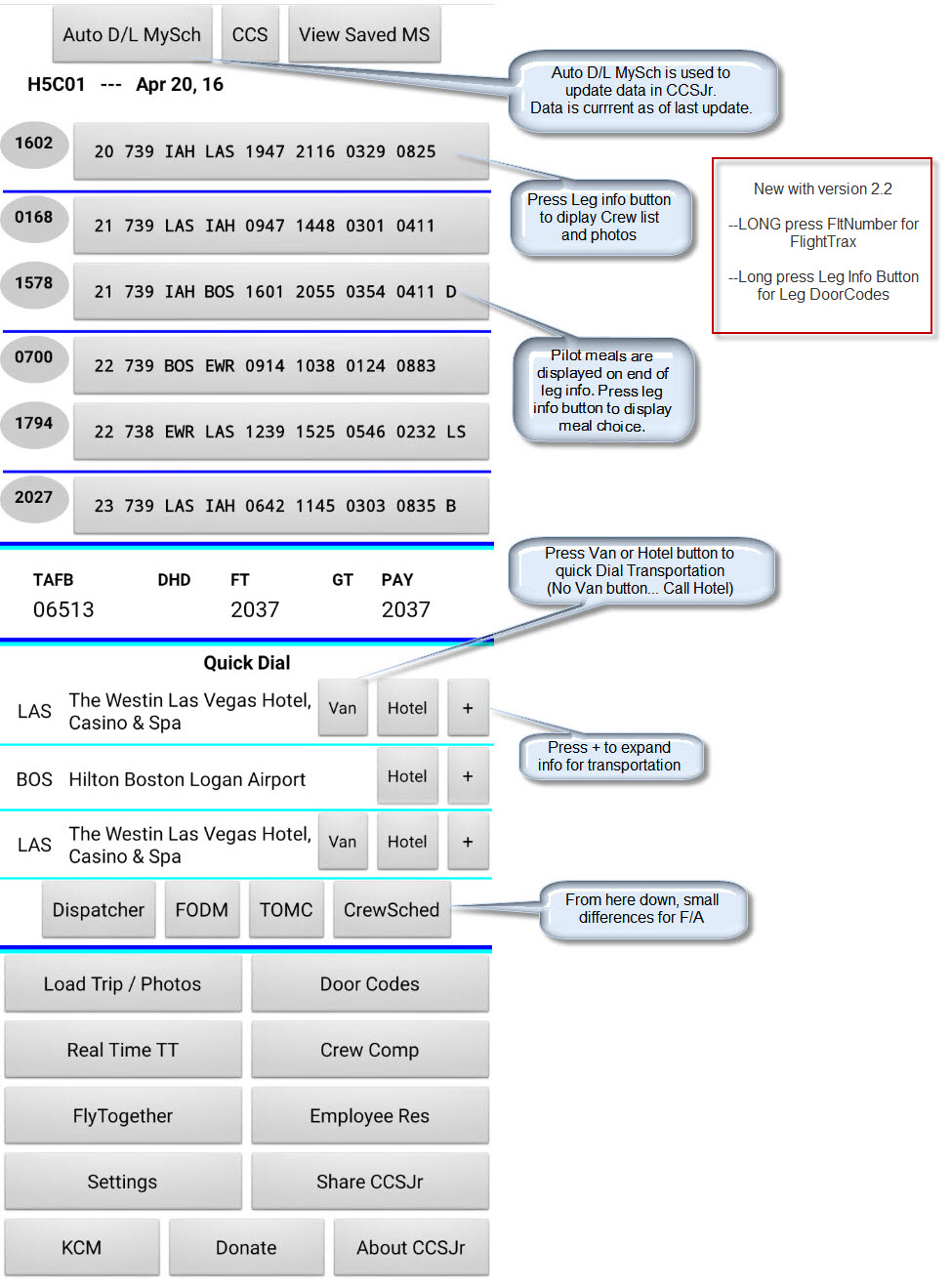
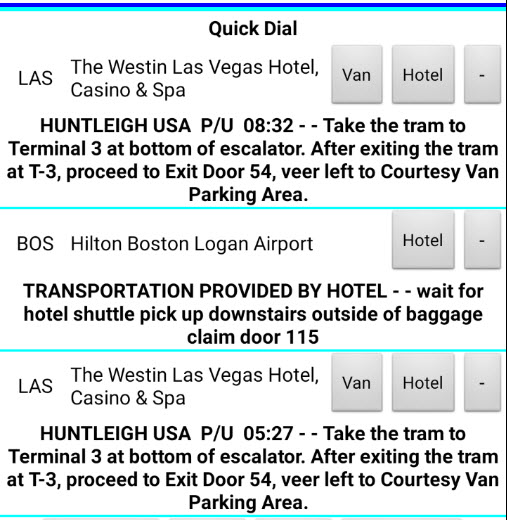
Main screen - Selecting + symbol expands Transportation Info
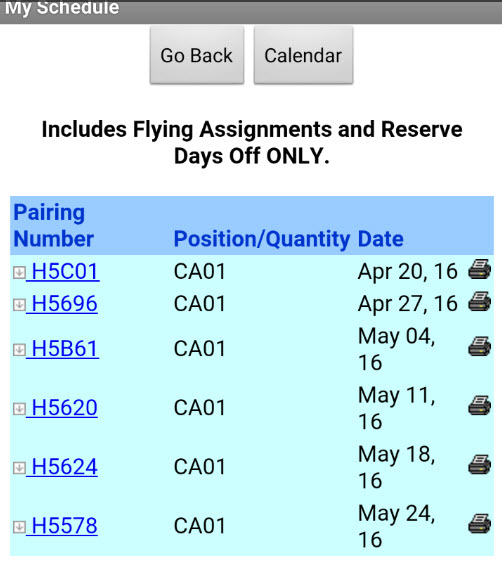
View My Schedule screen - For offline viewing - clicking on a pairing functions exactly like online
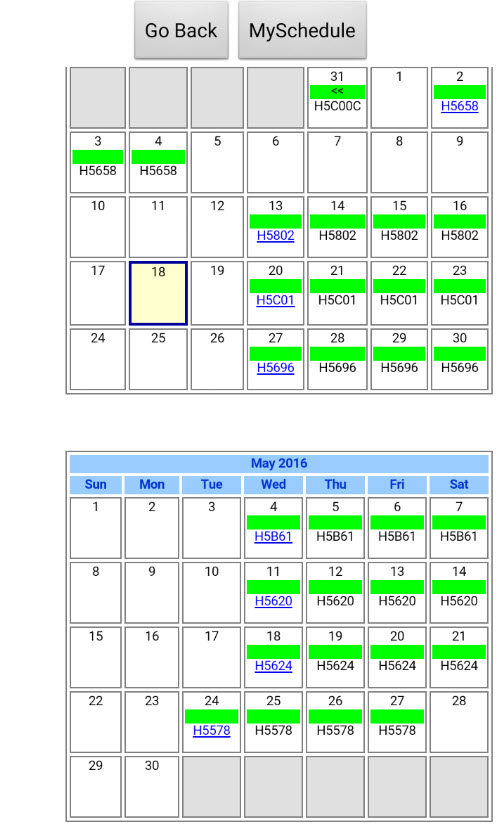
View My Calendar screen - For offline viewing - Selectable from My Schedule Screen
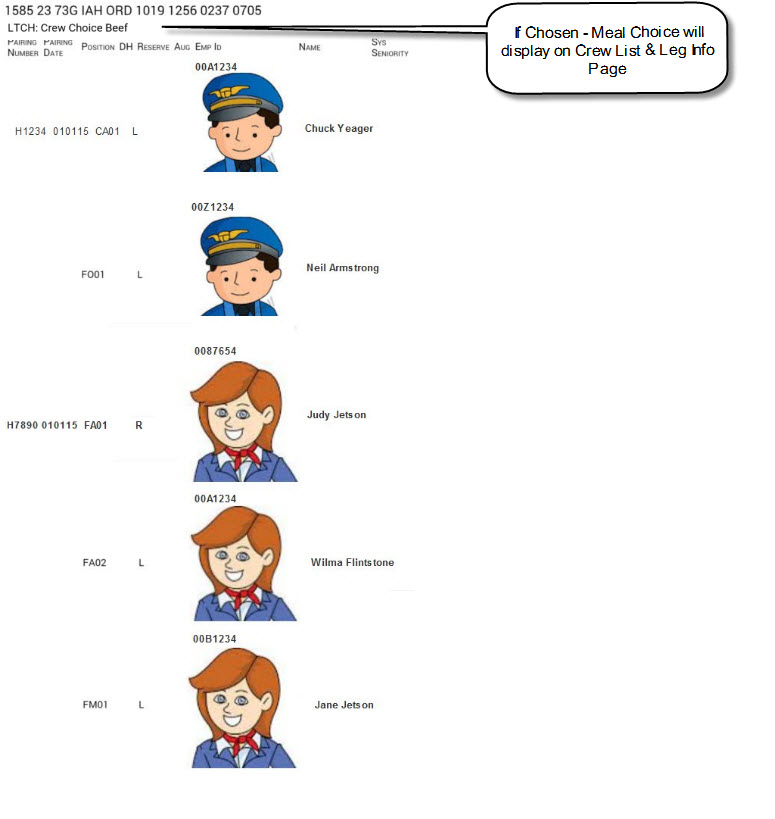
Leg info populates to Leg buttons - click on a Leg button to view crew list (Photos are loaded from the Load Trip screen)
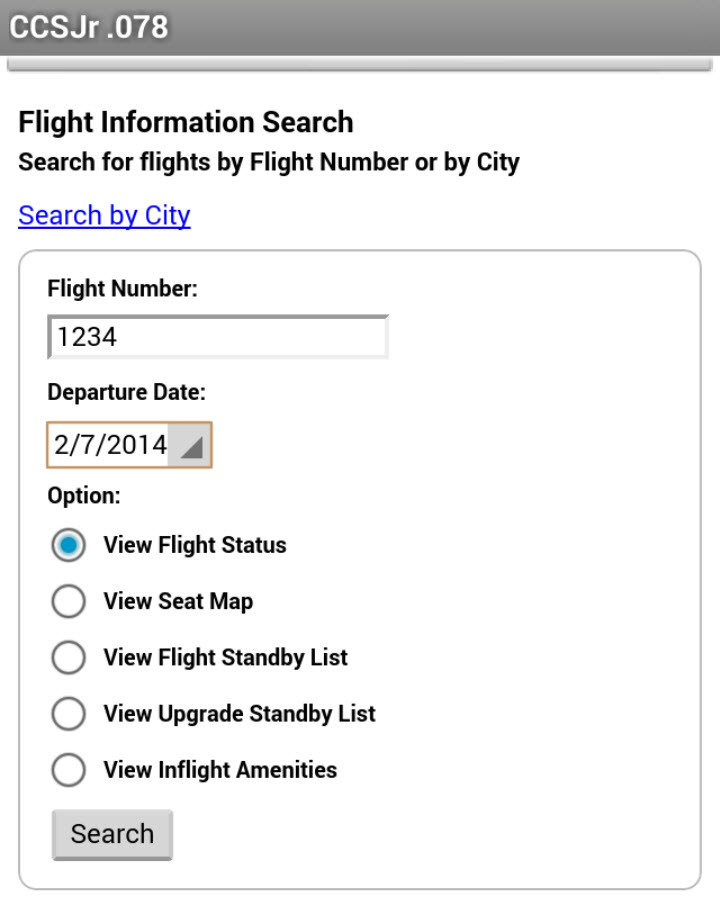
Flight Status screen - Flight number populates into Flight Number field
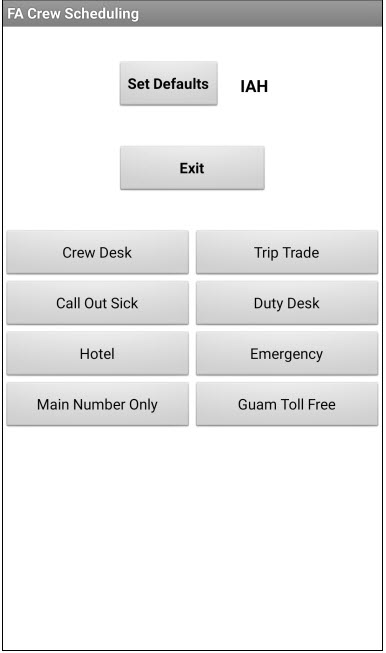
Crew Scheduling screen - Numbers and extension will dial if defaults are chosen
| Pilot | FA |
 |
 |
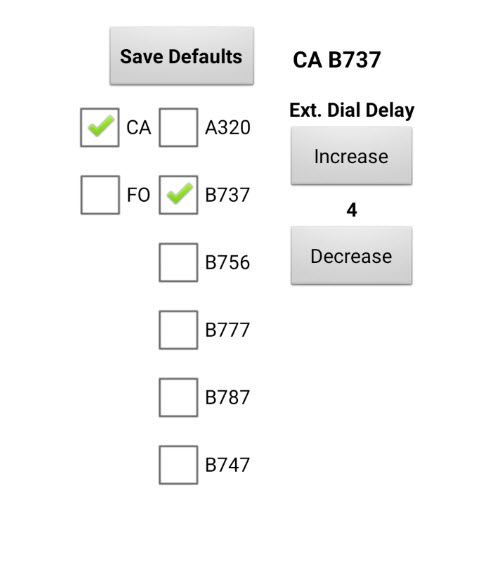
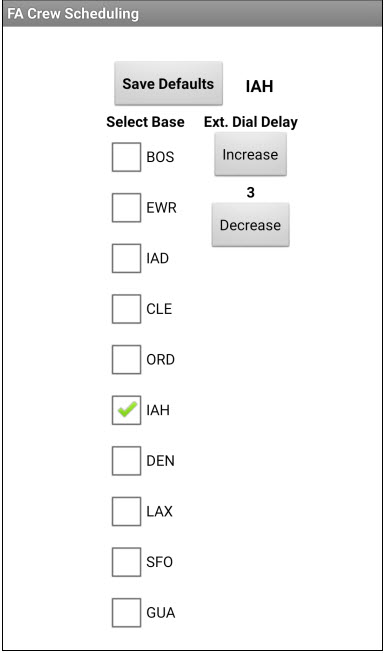
| Crew Scheduling "Set Defaults" screen - Select your information for dialing extensions | |
 |
 |
INSTALLATION INSTRUCTIONS:
****************************************
You may need to change settings to allow apps to install from Unknown sources
****************************************
*** After Downloading - Install CCSJr from your device Notification dropdown bar ***
****************************************
CCSJr also requires support files to be installed
CCSJr will install the support files on initial setup/registration
Installation instructions and features:
After you download and install.
The first run of CCSJr will ask for your your EmpID.
Press Register.
Now, fill in your COMPANY and CCS passwords and hit "Save Passwords".
Be assured your Passwords are NOT sent to the author!!! They are only saved internally in the app.
Your Device information and Employee ID will be sent to the Author. Your Employee ID is only used to keep up with subscriptions.
There are 2 ways to download your "MySchedule": Auto and Manual
FOR AUTO
Press "Auto D/L MySch" or New features in settings can change this button to "Get All" or "Get All & Load"
Sit back and watch... ( it helps to have a good data connection)
CCSJr will Login, Navigate to MySchedule(Desktop view) and Save your MySchedule
You then have the option to Download My Calendar or Get Calendar automatic with option checked in settings
After downloading CCSJr will prompt you to ask if you would like to Load a Trip or load 1st trip automatic with option in checked settings
FOR MANUAL
Press "CCS" and "Manual". Enter you EmpId and Passwords.
Navigate to My schedule - Desktop View(selected at the bottom of the screen). An easy way to navigate CCS is use the Menu option at bottom of CCS screen. Then press "Save MySch" to save all future trips (Pairings/Id's) listed on My Schedule and then logoff.
Now press "Load Trip" button and select a trip to load into the quicklaunch buttons for Flight status, Hotels, Ops, and Van Transportation.
You can now Press a Flight Number for Flight Status and also dial using the buttons to the right for Hotels, Ops, and Van Transportation.
You can also review your My Schedule screen.
During my schedule review selecting a pairing number or flight number will expand the info exactly like you were logged into CCS.
===================
Version History
===================
--------------------
CCSJr 2.48
--Changed Flight Status buttons to a List menu of options: UAL Flt Status, UAL Shares , Flight Aware
--Choosing UAL Shares from Flight Status Button auto populates Flight Number, Departure Airport, and Date to Shares screen
--------------------
CCSJr 2.47
--Changed MyIdTravel button to Travel
--New Under Travel button: UAL Shares or MyIdTravel
--New Under UAL Shares: P.S., S.A., AllPax, Connects, OOOI, PBT
--MyIdTravel should login automatically but all user data must be entered manually
--Improved Employee travel button for allready logged into FlyTogether
--------------------
CCSJr 2.461
--Fix for UAL Flight Status when leg is DH
--------------------
CCSJr 2.46
--Fix for UAL pictures address change
--Changed MyIDTravel website link (all info must be manually entered)
--------------------
CCSJr 2.45
--FltStatus Buttons now have option for FlightAware or UAL
--Changed phone tree for crew scheduling (Also added a delay check button, for long announcement message delays)
--------------------
CCSJr 2.44
--Fixed (Another tweak) for MyIDTravel
--Modified the FlightStatus button link
--Tweak for Pilot Crew Companion page load timing
--Sorry, still no update for F/A
--------------------
CCSJr 2.43
Fixed Login for MyIDTravel site change
Updated PhoneCall Dialing for new Android required Permissions(Should be back to 1-Click dialing!!!)
Tweaks for new permission requirements for new Android update
Sorry, still no update for F/A
--------------------
CCSJr 2.42
Changed Crew Companion to open Tradeboard Desktop View (Pilots Only)
Added new permissions required for new Android update
Added button and link for A/C Info(Is my D.H. seat in E+)
Fixed Login to MyIDTravel
Updated PhoneCall Dialing for new Android required Permissions(1st use of each QuickDial button requires 2 presses to dial-Normal after 1st use)
Sorry, still no update for F/A
--------------------
CCSJr 2.41
Update for Pilot Crew Scheduling phone tree
No Update for F/A CCS "MySchedule" screen change
--------------------
CCSJr 2.4
Update for FA CCS screen changes
Removed CCS Password from settings
--------------------
CCSJr 2.367
Added Form Fill for MyIdTravel and Settings data for MyIdTravel
Fix for Pilot Crew Meals and changes to CCS screen
Fix for Flight Status back arrow error
--------------------
CCSJr 2.366
Fix for EmployeeRes Button for FlyingTogether Website changes
Fix for FltStatus Buttons for Website changes
--------------------
CCSJr 2.365
Fix for phots Flying Togetherlink change
--------------------
CCSJr 2.364
Fix KCM link change
Fix For Calender when month has two 1st displayed (Feb 1st & Mar 1st displayed both in Feb)
Main screen empties all legs and Flight numbers when no trip is on schedule (One Flight status button remains)
--------------------
CCSJr 2.363
Added ability to download and view PBS HTML files
Fixed Comments button display(hides Comments button while viewing Flight Status)
Adjusted Flight Status webviewer screen size
Adjusted Download photos webviewer screen size and Tweaked the photos display
Fix For Leg 11 Date
Changes to Calendar view - Current date is larger font and note about Blue Border
--------------------
CCSJr 2.362
Added PCS phone number to pilot Crew Scheduling screen
Added MyIdTravel button
Fixed About CCSJr link
Improved photo download speed... (only downloads each photo once)
Changed format of "Whats New" info screen
CCSJr can now view PDF files (Bulletins, Bid Packages, PBS PDFs)
--------------------
CCSJr 2.361
Small change to Saved My Schedule - No more printer icons
Cleaned up login script for one password login... CCSJr still logs in using both (will probably need fix for when IT fully implements one password)
Added New button on dial dispatch screen for redial last number
Changed Pilot default extension time delay for Crew Scheduling to 3 sec. (was 5)
Added "Whats New" button to main screen
--------------------
CCSJr 2.36
Added Toggle below Download Photos button - for phones that display photos different (problem with viewing Leg Info with photos - black or white images)
--------------------
CCSJr 2.35
Fix for Photo D/l (problem with viewing on Leg Info with photos- black images)
Fix for FlightTrax display of flight number when leg is DeadHead
--------------------
CCSJr 2.34
Another Fix Login for Photo D/l - Tweak for slow internet connection
--------------------
CCSJr 2.33
Fix Login for Photo D/l
--------------------
CCSJr 2.32
Improved Login procedures. (Flytogether, EmployeeRes, FlightTrax, and Photo D/l)
Added Blue Left and Right Arrows, for back and foward buttons, on all website screens
Old CCSJr.apk install/upgrade downloaded files in /Download folder now removed
--------------------
CCSJr 2.31
Improved Login CCS
CCSJr will now continue with Automation Selected after Acknowlegment of Priority Message
--------------------
CCSJr 2.3
Much Improved Login for FlyTogether, EmployeeRes, and Photo download
Fix For FlightTraX if flight number started with a "0"
Tweaked the timing of CCS Login with AutoFill of info
--------------------
CCSJr 2.2
Now LONG pressing Leg Info Button will go to DoorCodes screen and prefill the Airport field with Departure and Arrival airport codes.
Added a "WhatsNew" notifier for upgrades
Added New update routine for newer Android Versions (uses External Browser)
Added LONG Press for Flight Number Buttons... Logs into Flight Trax
--Updated All Login Procedures (CCS, FlyTogether, EmployeeRes, and Photo download location) for IT changes on CCS
--------------------
CCSJr 2.11
Modified the Notifier for navigating to to different CCS Screens to "Getting MySchedule and Calendar" when Get Calendar option is checked in settings
--------------------
CCSJr 2.1
Added New feature to Get All & Load (Download My Schedule, Calendar, and Load 1st Trip on Schedule)
Added Check Boxes in settings for- - Get Calendar and Load 1st Trip
The Auto D/L MySchedule, Get ALL, and Get ALL & Load button changes depending on what you have selected...(User Selectable in settings)
Load Trip Screen Trip buttons Hide when you Load a trip and then re-appear after the trip is loaded
--------------------
CCSJr 2.0
Added a login to Flying Together to save employee pics.
Complete change for FA Phone dialing tree.
On initial install - Changed ViewMS Button to hidden until ater first download of My Schedule.
Support files are no longer downloaded from web. Support Files are now included in the app and installed from Assets folder on initial Registration/Setup.
Added Check for missing support files and Notifier if any are missing on startup.
Changed Pilot Meal designator from "B S" to "BS" (removed space).
Removed requirement to input email on Initial install/setup. CCSJr now reads your information from phone for registration. You only need to input your EmployeeID.
--------------------
CCSJr 1.9963
WebViewer Screen Size is now set by a percent of full screen - No need to manually set screen size in settings - (Flight Status, CCS , Crew List screen(photos), Share, About, KCM)
Changing device to portait or landscape resets screen size for each view
Added Ops button for dialing Ops - After pressing "+" symbol Ops button will display if trip has Ops phone numbers(Some trips do not)
Small Change - Meals S B changed to SB
Photos currently Inop
--------------------
CCSJr 1.9962
Fix for photo download web address change
--------------------
CCSJr 1.9961
Added a "Standby Loading Trip" text bar while loading a trip
After Downloading Photos, Load Trip Screen will now close automatic
--------------------
CCSJr 1.996
Fix for error with Pick-Up time on second layover
--------------------
CCSJr 1.995
Removed OPs Button, since Ops phone number is no longer on CCS in Trip info.
Moved Van Button to the left of Hotel Button
(When Transprotation provided by Hotel... Van button will not display)
Changed the Leg Information Button font size from 11.0 to 12.0
Added a "+" and "-" to the right of Hotel to Expand or Contract the Van information text - Now also displays walking directions to Van
Added a "Comments" button - Should only display if the trip has Comments (load a trip with Comments to be visible)
--------------------
CCSJr 1.994
Fix for EmployeeRes Login
Fix for FlyTogether Login
--------------------
CCSJr 1.993
Fixed AutoLogin
--------------------
CCSJr 1.992
Temporary fix for CCS Login issues
CCS.COAIR.COM is now CCS.UAL.COM
--------------------
CCSJr 1.991
Fix for Line 1 in van phone number
Fix for xt in van phone number
Fix for change in HTML in CCS My Schedule
--------------------
CCSJr 1.99
Changed Crew Scheduling dialing screen and improvements for dialing Phone Tree
Added a default selection for dialing tree
Added "Increase" and "Decrease" for dialing extension time delay
--------------------
CCSJr 1.989
Added Buttons for Employee RES and Flying Together
Added Forward and Back capability to the WebBrowser for CCS, Employee RES, and Flying Together
Fixed the script for Auto Login
Fix for Reserves My Schedule - Corrected parsing for "Includes Reserve Days Off Only."
--------------------
CCSJr 1.988
Added Title to Quick Dial section
Added Quick Dial Buttons for Pilots: Dispatcher, FODM, TOMC, and Crew Scheduling
Added Quick Dial Button for FA: Crew Scheduling
Fix for Reserves My Schedule - Corrected parsing for "Includes Flying assignments and Reserve Days Off."
Added parsing for new info in CCS - "AUG" title for column on MySchedule Table
--------------------
CCSJr 1.987
Added divider lines between flight dates
Added Information for setting screen size - under the Blue Line at the bottom of Flight Status screen
Moved Exit button to the top of Load Trip Screeen
--------------------
CCSJr 1.986
Selection Required for Pilot or FA
Added new Buttons for Real Time TT and Crew Companion for pilots and Opentime for F/A's
LCAL Photos are working again!!!
--------------------
CCSJr 1.9854
Fix for Exit button to appear earlier during DoorCodes selection
Increased size of Login Button
Added a new Button KCM - Navigates to Known Crew Memeber
Change CCSJr Icon
--------------------
CCSJr 1.9853
Fix for Exit button to appear earlier during Auto D/L My schedule
Change CCSJr Icon
--------------------
CCSJr 1.9852
Fix for another Change in CCS Login HTML code
Now CCSJr Gets the CCS Login.html and then inserts your EmployeeID and Passwords into the downloaded HTML
--------------------
CCSJr 1.9851
Fix for another Change in CCS Login HTML code
--------------------
CCSJr 1.985
Fix for another Change in CCS Login HTML code
--------------------
CCSJr 1.984
Fix for Login Change in CCS HTML code
Added Manual screen size settings - For devices having trouble with Auto Screen size
Changed Icon of CCSJr
--------------------
CCSJr 1.983
Fix for Test Table in CCS HTML code
--------------------
CCSJr 1.982
CCS button now has option for Auto Login or Manual Login - in case Auto is inop
--------------------
CCSJr 1.981
Auto login is fixed - CCS button is Manual login in case Auto fails
--------------------
CCSJr 1.98
Temporary version to allow Manual login to CCS - With changover in CCS, Auto Login needs some work
--------------------
CCSJr 1.971
Minor Fix for Trip Totals HTML - Disabled Zooming (No More +/- displaying over trip totals)
--------------------
CCSJr 1.97
Fix for HTML Change on CCS ("Sys Seniority" changed to "Sys Sen" - Fixed parsing to "Sys Sen")
--------------------
CCSJr 1.96
Added Door Code button
Added ".nomedia" file in each of the CCSJr subfolders... Now CCSJr images should not display in Gallery
--------------------
CCSJr 1.95
Fix for change in Crew meals on CCS
--------------------
CCSJr 1.94
Changed Webviewer to Fill Parent for: Flight Status, Crew List, and View saved MS
Loading a new trip deletes all previously downloaded photos
Removed button for Screen size - Since Fill Parent is automatic screen size ajustment
(Version 1.94 was being tested and almost posted, then CCS crew meals options were changed - 1.95 was posted)
--------------------
CCSJr 1.93
Changed the Font and Color of Totals on Main Screen
--------------------
CCSJr 1.92
Added Trip(Pairing) Totals to Main Screen
Load screen "Exit" Button now turns green after downloading photos
--------------------
CCSJr 1.91
Minor fix for pressing device(phone) back button while viewing Flight Status, Leg info, Share CCSJr, About CCSJr, and Donate
Now "Auto D/L MySch" button becomes visible... Same as pressing the "Exit" button on screen
--------------------
CCSJr 1.9
Added "Auto D/L MySch" button - Auto D/L button will log into CCS, Navigate to MySchedule(Destop), Save My Sch., and then prompt for loading a trip
Added a notification for Priority Message during Auto D/L MySch. - Auto D/L will stop if Priority Message is detected
Change CCS button to Autologin - now only 1 click to log in to CCS
Changed the Van "Pickup Time" to "P/U" - Conserving space for long van company names
--------------------
CCSJr 1.8
Added meal selected to leg display
Fix for 1 day trip not parsing correct
--------------------
CCSJr 1.7
Fix for Leg display for Pilot meal option (new option in CCS)
--------------------
CCSJr 1.6
Another Major Change to CCSJr. Crew Photos are now downloadable for each Trip
Click on the flight leg Button to display crew information/photos for the leg.
To download photos - Load a Trip and then press Download Photos
Photos are not required to be downloaded - If you don't want photos just load a Trip and then press Exit
Crew List and Photos are current at the time you Save My Schedule
To update crew list - login to CCS and Save my Schedule - Then load the Trip
--------------------
CCSJr 1.5
Major Change to CCSJr - Now each flight leg information is a Button. Click on the Button and display crew information for the leg.
--------------------
CCSJr 1.4
Fix for CCS Changes in Van phone numbers
(CCS added a 2nd extension...Example: 800-555-1212 x1000 or x2000)
CCSJr will ask if you want to dial the Main number only or the Main number and first extension
Currently the only way to dial the 2nd extension is to dial the Main number only and then manually dial the 2nd extension
--------------------
CCSJr 1.3
Fix for Android 4.4.2 and above for freezing while logged into CCS
New setting for adjusting WebViewer screen size
Rearranged buttons and changed the text on buttons, to decrease button size and use less of the screen on CCS
--------------------
CCSJr 1.2
"SaveToSD" app no longer required
YOU CAN UNINSTALL "SAVETOSD"
Increased size of Search button on Flight Status
Increased size of Login button on Login Screen
--------------------
CCSJr 1.1
Added Meals to end of flight leg
Added 30 day trial
Fix for Van numbers with extension - CCSJr will now dial the extension after 5 sec delay
Fix for error when connected to WiFi but not connected to internet
--------------------
CCSJr 1.0
This is a major rewrite(completely started over) with MIT App Inventor Version 2.0.
New upgrade/install procedure (automatically runs package installer after download of upgrade)
Once logged into CCS you only have to save"My Schedule"(Desktop View), Quick launch button data is loaded from a new "Load Trip" screen.
Flt. Status buttons now open a new window at top of screen and screen is scrolled to the top on launch
Hotel information is now listed with van pickup times(if in CCS)
New share button to share the app
--------------------
--------------------
--------------------
--------------------
--------------------
--------------------
CCSJr beta .078
Added tomorrow in the flight status HTML
Fix for the documents at the bottom
--------------------
CCSJr beta .077
Fix for displaying saved MySchedule
--------------------
CCSJr beta .076
Fix for changes to CCS - MySchedule
--------------------
CCSJr beta .075
Changed the screen display and added the name of the Van Transportation
--------------------
CCSJr beta .074
Fix for changes to CCS - Menu source
--------------------
CCSJr beta .073
Got tired of dealing with Free PHP servers so I purchased a hosting service
Hopefully things will run a lot smother!!! :) :) :)
--------------------
CCSJr beta .072
Still having problems with server for PHP
version .072 didn't last long
--------------------
CCSJr beta .071
Problems with a FreeIZ server and PHP... Changed server to ServerFree
ServerFree seems to be slower... Still working on a soloution :)
This is the PHP server that is used when saving one pairing or saving my schedule
--------------------
CCSJr beta .070
Added buttons to view and D/L Hotel Information, Van P/U locations, and UAL Pilot Contract
Viewing the PDF documents reguires Adobe Reader installed from the Play Store
--------------------
CCSJr beta .069
Flight Status buttons changed to ovals and font decreased in size
Leg information font decreased in size
--------------------
CCSJr beta .068
Flight Status buttons working perfect now!!!
SavetoSD no longer saves Login info or Flight Status files to Sd-Card
--------------------
CCSJr beta .067
Fix for change in CCS Pairings that do not have Van(Limo) or OPS Phone numbers
--------------------
CCSJr beta .066
SaveToSD - Now saves: Login, FltStatus, One Pairing, and MySchedule to downloads folder
Users that upgrade from .065 or earlier will need to long press "Edit Login Info" and then short press "Edit Login Info", then press "Download and Save Support files to SD Card"
(all support Java files are now stored in the downloads folder)
Improved FltStatus Buttons - Greatly improved speed by using SaveToSdcard
You can also delete old folders and files from your Sd-Card
Delete Folders - CCD, images, img, and js
Delete Files CCSJr.html, CCSJrSave.html, FltStatus.html, mySchedule.htm
These folders and files are now created and saved in the downloads folder.
--------------------
CCSJr beta .065
Added SaveToSD - App to assist CCSJr with saveing the HTML files to SD-card
Fix for dropbox folder renaming
--------------------
CCSJr beta .064
Added a Save Both button for saving one pairing and MySchedule
--------------------
CCSJr beta .063
capture(fix)for screen error during offline view
--------------------
CCSJr beta .062
Fix for Date Expiration during My Schedule Import
--------------------
CCSJr beta .061
Cleaned up the My Schedule file for offline viewing
Rearanged Buttons on main screen
Added Notification menus and checks for Desktop view during Save My Schedule
--------------------
CCSJr beta .06
added abilty to save my schedule for offline viewing
--------------------
CCSJr Beta .05
fixed 2nd layover van phone number
--------------------
CCSJr Beta .04
Added checkbox for making passwords visible during save
This is a work-around for devices that want save both passwords correctly
--------------------
CCSJr Beta .03
Added check for Mobile view when saving pairing
Rearranged buttons and screen
View saved pairing now displays pairing number in button
--------------------
CCSJr Beta .02
Added Flight Status buttons(up to 10 legs for now)
Added Flight details information from pairing
--------------------
CCSJr Beta .01
The Beginning
Working app able to dial phone numbers only
Stores data for up to 3 layovers(hotel, ops, van)
-------------------